
Framer's Pricing Plan Structure
Framer offers multiple plans ranging from individual to enterprise use, catering to a wide variety of needs. This guide uses the information available when the article was published to explain what to compare before choosing a plan.

The Importance of Bandwidth
The most critical factor when evaluating Framer's pricing plans is the bandwidth limit.
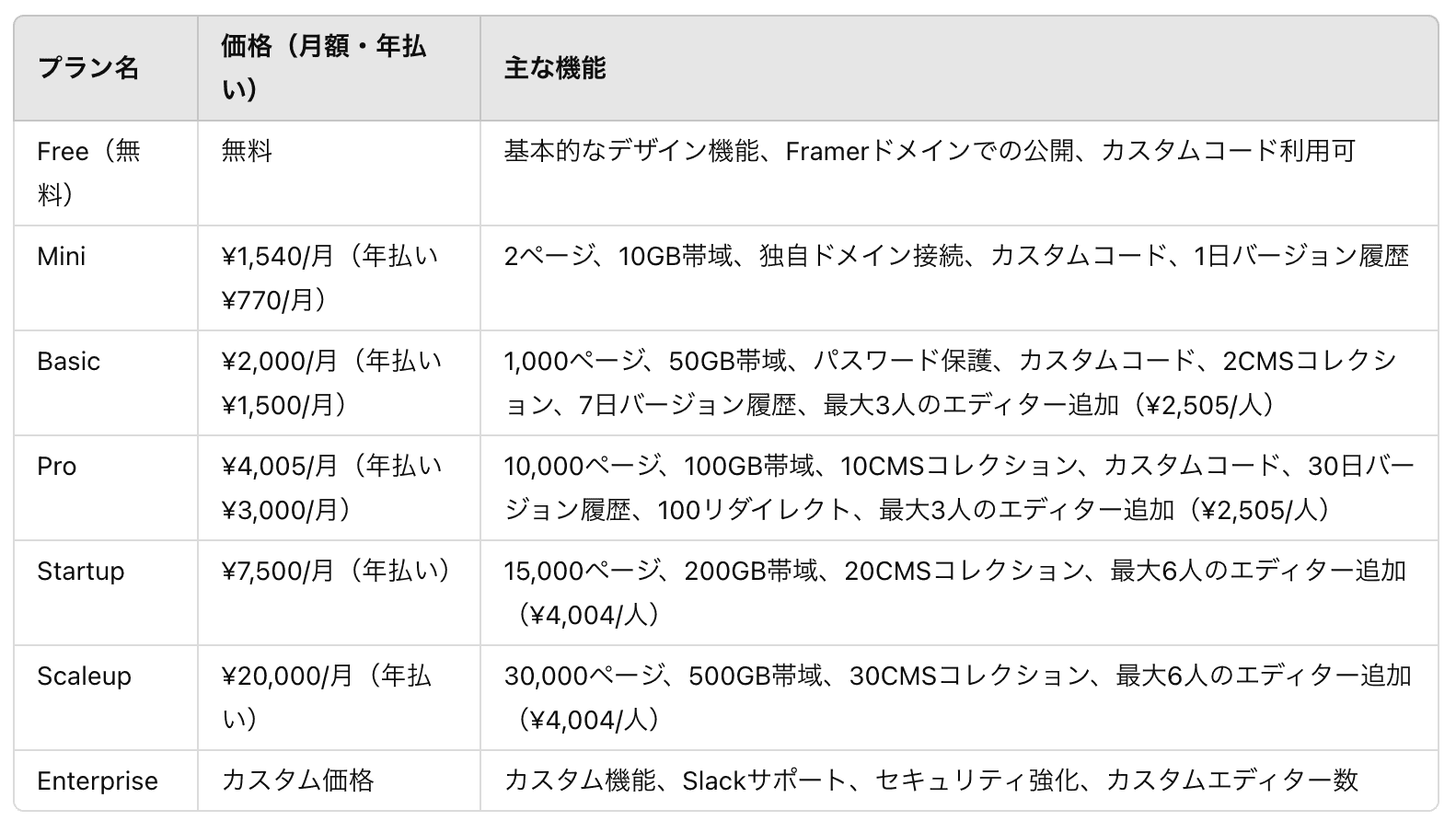
Here is the bandwidth for each plan:
| Plan | Bandwidth |
|---|---|
| Mini | 10GB |
| Basic | 100GB |
| Pro | Higher tier |
| Enterprise | Custom |
Note: Sites with heavy images or video may reach bandwidth limits quickly. If you're running a portfolio site or image gallery, consider opting for a higher-tier plan.
Collaboration Features
When using Framer as a team, additional editor fees apply.
- Additional editor cost — Approximately $15–$25/person (varies by plan)
- Version history — Retention period varies by plan (limited on free plans, longer retention on higher tiers)
For larger teams, factor in the per-person additional costs when choosing a plan.
Custom Code Feature
It may come as a surprise, but custom code functionality is available even on the free plan.
Practical Use Cases
- Google Analytics integration — Embedding tracking codes
- API integrations — Connecting with external services
- Custom animations — Advanced animations using Framer Motion
- SEO optimization — Adding structured data
Plan Selection Guide
For Personal Use or Trying It Out
Starting with the free plan or Mini plan is recommended. Since custom code features are available, there's almost no shortage of functionality.
For Freelancers and Small Businesses
The Basic or Pro plan is a good fit. You'll have access to custom domains and sufficient bandwidth.
For Enterprise Use
For team usage, consider the Enterprise plan. It offers priority support and custom bandwidth.
What to Check Before Choosing a Plan
Framer pricing depends on several factors: plan name, additional editors, CMS needs, localization, and bandwidth. Before subscribing, always check the latest details on the official Framer Pricing page.
For team usage, look at both the site plan and workspace member costs. For client projects, list the requirements first: number of published sites, custom domains, forms, CMS, and version history. This makes plan selection much less error-prone.
Conclusion
Framer's pricing plans are structured to allow flexible selection based on your scale of use. The smartest approach is to start with the free plan to test the features, then upgrade as needed. Use bandwidth and collaboration features as your primary criteria for choosing the plan that best fits your project.